Guides › How to Set Up a Hive Wallet (and Keep It Safe in 2026)
How to Set Up a Hive Wallet (and Keep It Safe in 2026)
Published Jul 2, 2026
A plain-English guide to what a Hive wallet really is, the posting/active/owner keys, using Hive Keychain, and keeping your account safe.
If you’re coming from crypto, the phrase “Hive wallet” can be confusing. On Hive there’s no separate app you download to hold coins. Your Hive wallet is really just your account plus the private keys that control it. Get the keys right, and everything else is straightforward.
Create your Hive account — start here (beginner route)
You need a Hive account before you can use igsh.tv (or any Hive app). The good news: this choice isn’t risky.
Whichever provider you pick, you're creating the same thing — one Hive account. The only difference is the sign-up window. Every Hive service (IGSH.TV, Ecency, PeakD, and more) works with the same account — so you never have to choose again, and there's nothing to "get wrong."
For your first Hive account, use Ecency — it’s free, has a mobile app, and is the simplest path to IGSH.TV.
- Free sign-up with email
- Post and manage your wallet in one app
- Works with IGSH.TV and every Hive app afterward
For: “I just want to try IGSH.TV.”
Create with Ecency →✅ A Hive account made with Ecency works as-is on IGSH.TV and every other Hive app later — there's nothing to migrate, and no need to switch.
How the Ecency sign-up looks:
On ecency.com, open the free sign-up (look for Get Free Account). We don’t show a screenshot of Ecency’s landing page — it changes often — so just pick the free option there.
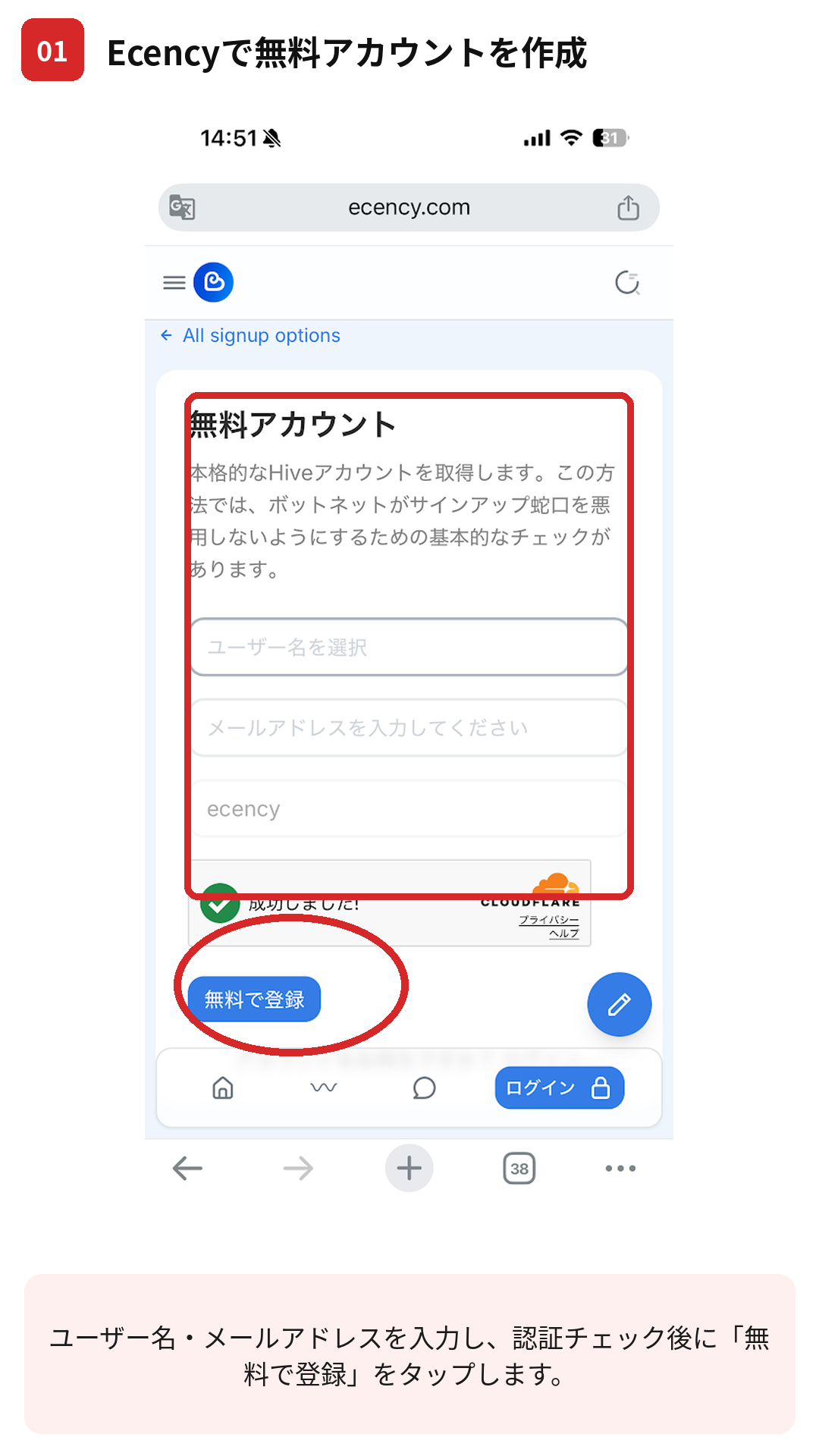
Fill in the sign-up form
Enter a username and your email, pass the Cloudflare check, then tap the register button. Your username can't be changed later — choose carefully.
Save your keys — this screen is not shown, for safety
Set up Hive Keychain
Once your account is created and your keys are saved, set up Hive Keychain and log in → How to set up Hive Keychain.
Alternative signup options (advanced)
Most users should use Ecency. The providers below are alternative signup methods intended for advanced users or specific use cases.ほとんどの方は Ecency をご利用ください。以下は上級者向け、または特定用途向けの代替登録方法です。
- PeakD Best for existing Hive users
Its sign-up lets you pick from several account creators. → peakd.com - HiveDapps Community onboarding
A community member creates your account (opened from PeakD's sign-up). - Hivedex Crypto payment signup
Pay with crypto for an anonymous account (opened from PeakD's sign-up). - Splinterlands Best for gamers
Creates a Hive account, but it's built for starting the game.
See every official option at signup.hive.io. Some are free; some charge a small one-time fee for the on-chain account.
Whichever route you use, the key-safety rule is the same: save your Master Password and Owner Key offline the moment they appear — they’re shown once and can’t be recovered.
What a Hive Wallet Actually Is
When you create a Hive account, you get a username (like @yourname) and a set of private keys. Your HIVE and HBD balances live on the blockchain, tied to that account — not in a file on your computer. So “backing up your wallet” really means backing up your keys. Lose them and no support desk can restore access, because Hive is a decentralized network with no central company holding your funds.
Creating an account (using one of the providers above) is the first step. When you finish, you’ll be handed your keys — save them immediately, before doing anything else.
The Different Keys, In Plain Terms
Hive uses several keys so that everyday actions don’t expose your most powerful credentials:
- Posting key — for low-risk stuff: posting, commenting, voting, following. This is the one you use daily.
- Active key — for money and account actions: transfers, powering up, trading. Use it only when moving funds.
- Owner key — the master key. It can change all your other keys. Store it offline and almost never touch it.
- Memo key — encrypts/decrypts private messages attached to transfers. Least critical.
The idea is simple: use the weakest key that gets the job done. If your posting key ever leaked, someone could spam from your account, but they couldn’t drain your funds — those need the active key.
There’s also a master password, a long string that can generate all of the above. Treat it like the owner key: offline, backed up, never pasted into random sites.
Using Hive Keychain
You don’t want to type these keys into websites by hand. That’s what Hive Keychain is for — a browser extension (and mobile app) that stores your keys locally and signs actions for you, so a site only ever gets a yes/no approval, never the key itself. Our step-by-step Hive Keychain setup guide walks through installing it and adding your account.
Once Keychain holds your keys, logging into Hive apps takes one click. When you upload your first video to Hive, for example, the app asks Keychain to sign the post with your posting key and you just approve the popup. On igsh.tv, a modern Hive + IPFS video app, the same flow works: native uploads play in its own clean player, and creators keep 97% (a 3% platform beneficiary) plus any direct tips.
How HIVE and HBD Arrive
Two things live in your wallet: HIVE (the network’s main token) and HBD (a dollar-pegged token). They show up when you earn rewards on posts, receive tips, or transfer in from an exchange. If you want to fund your account to start, our guide on how to buy HIVE covers the basics of getting some and sending it to your username.
Beginner-friendly exchanges that list HIVE, by region.
See exchange options →Exchange availability and rules differ by country, so check what’s legal and supported where you live. None of this is financial advice.
Keeping It Safe
A few habits cover most of the risk:
- Write your keys on paper or store them in a password manager — never in a plain text file synced to the cloud.
- Keep the owner key and master password fully offline.
- Only approve Keychain popups you triggered yourself.
- Bookmark real Hive apps; phishing clones are the most common way people lose accounts.
"Fully offline" is easiest with a hardware wallet like a Ledger — your most powerful keys live on a device that never touches the internet. It's the standard upgrade once your account starts holding real value.
Check hardware wallets →FAQ
Is a Hive wallet an app I install? Not exactly. Your wallet is your account and keys on the blockchain. You interact with it through apps and a wallet interface, but the funds aren’t stored in any single program.
What happens if I lose my keys? There’s no recovery desk. If you still have your owner key or master password, you can reset the others; if all keys are gone, the account is effectively lost. That’s why backups matter more here than on a normal login.
Which key should I use day to day? The posting key. It handles posting, voting, and commenting but can’t move funds, so keeping it in Keychain for daily use is low-risk. Reach for the active key only when transferring or trading.